Polar affiliate tracking, renewals included.
Polar affiliate tracking with AffiliateTracking takes one script tag and one webhook. The script adds the affiliate's token to your Polar checkout links, and every paid order, renewal and refund lands in the same ledger.
Checkout links: no extra codeRenewals credit the same affiliateCloud and self-host
https://buy.polar.sh/polar_cl_8f2c……/polar_cl_8f2c…?reference_id=…order.paid → Jane's commission, checked by 13 fraud rulesA Polar checkout link before and after the script. Example data.
From click to commission
How a Polar sale finds its affiliate
The same path as every other sale. Polar's reference_id carries the token from the link to the order.
- 01The click
A visitor opens an affiliate's link. AffiliateTracking records the click and sends them to your site with a signed token.
- 02The script keeps it
t.js saves the token in a cookie on your domain for your attribution window, 30 days unless you change it.
- 03The link carries it
The script adds the token to your Polar checkout links as reference_id. Polar copies it onto the order.
- 04Polar tells us
order.paid arrives, the 13 fraud rules run, and the customer stays linked to that affiliate.
Set up Polar in three steps
The script tag is the only code, unless you create checkouts through Polar's API. The rest happens in Polar and in your settings.
-
Add the script to your site
Paste it on every page, right before </head>. It adds the token to buy.polar.sh checkout links by itself, sandbox links included. Your workspace settings show the tag with your own address filled in.
<script src="https://yourbrand.affiliatetracking.co/t.js" async></script>
-
Add a webhook in Polar
In Polar, open Settings, then Webhooks, and add an endpoint. Choose the Raw format and tick two events. Polar then shows a secret that starts with whsec_.
# URL
https://yourbrand.affiliatetracking.co/webhooks/polar

# Format
Raw

# Events
order.paid
order.refunded
-
Paste the secret
On cloud, paste it into the Polar field under Billing webhooks in your settings. On self-host, set it as AE_POLAR_SECRET and restart. AffiliateTracking checks every event against it before it writes anything.
# Cloud: Settings, Billing webhooks, Polar
Webhook secret: whsec_...

# Self-host
AE_POLAR_SECRET="whsec_..."
Creating checkouts through Polar's API? Read the visitor's at_token cookie on your server and set it as metadata.aff_token on the checkout. Polar copies checkout metadata onto the order, and AffiliateTracking reads it from there.
What each Polar event does
Each event has to pass Polar's signature check, and it counts once, however many times Polar sends it.
| Polar event | What AffiliateTracking does |
|---|---|
order.paid, first order | Reads the token, credits the affiliate on the net amount (after discounts, before tax) and links the customer to them for good. |
order.paid, renewal | Polar makes an order for every subscription charge. Each one credits the linked affiliate. No token needed. |
order.paid, $0 | A free trial or full discount links the customer without a commission. Their first paid renewal earns it. |
order.refunded | Takes back the refunded share of the commission. A second partial refund takes back only the new part. |
| Any other event | Accepted and ignored, so ticking extra events breaks nothing. |
Where a Polar sale shows up
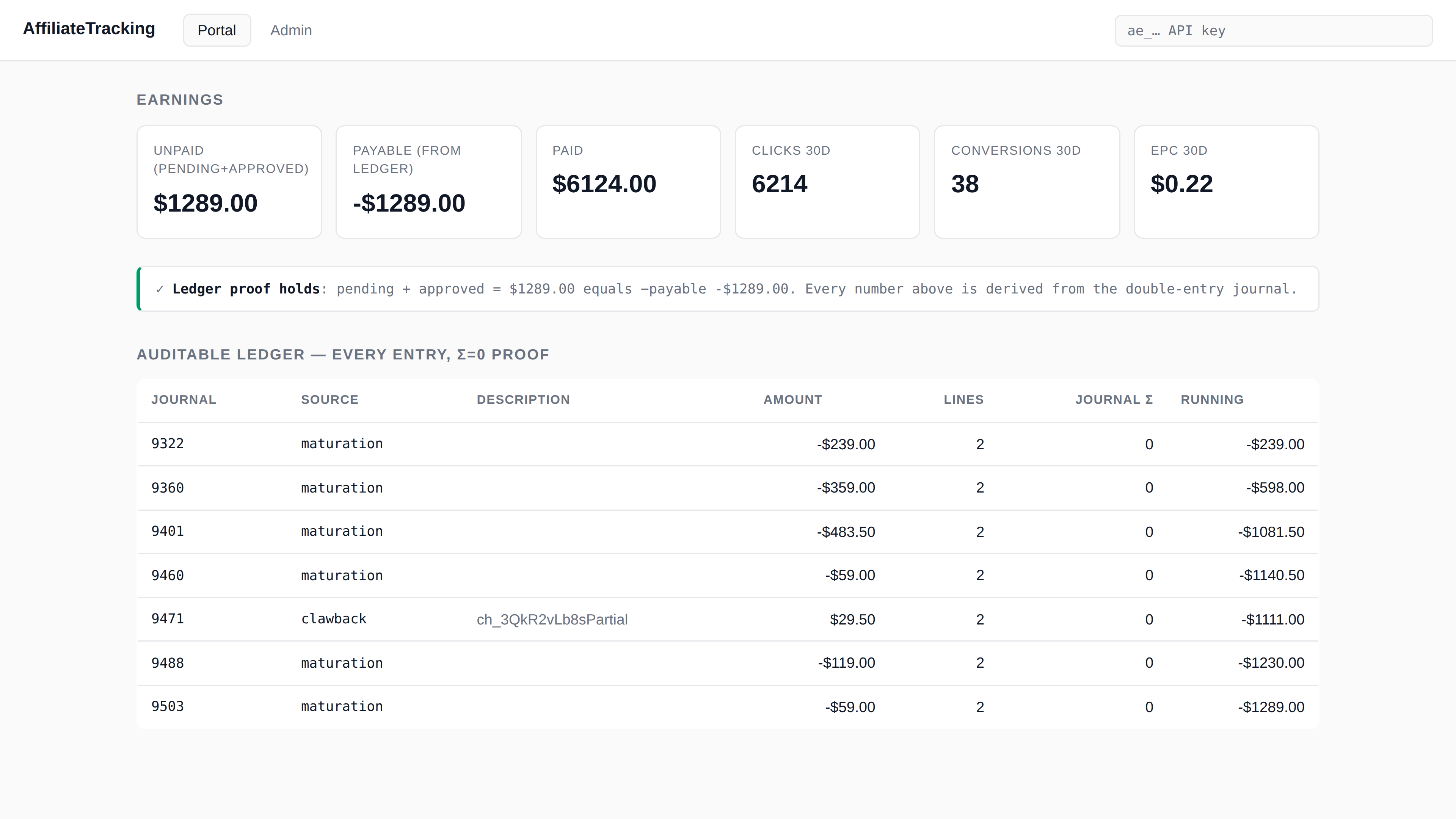
Each paid order becomes a journal in the partner's ledger, in the order's own currency. A refund adds a second journal that takes the share back. Nobody edits a journal after the fact.
The partner sees the same entries in their portal, with proof that every journal sums to zero. How the commission ledger works covers the rest.
Good to know before you start
Four details, including one limit worth planning around.
Keep the sandbox apart
Polar's events carry no test flag. Point sandbox webhooks at a separate workspace or install, or test orders earn real commission.
Renewals need no token
Once a customer has an affiliate, every later order credits that same affiliate.
Your own reference wins
A checkout link that already has a reference_id is left alone. The script only fills an empty one.
Rates per product
Polar product IDs work as product keys, so one product can pay a different rate from another.
Polar FAQ
How do I run an affiliate program on Polar?
Polar takes the payments and AffiliateTracking tracks who sent each one. Add the script to your site, point a Polar webhook at your workspace and paste its secret. Then invite affiliates.
Do I need a developer?
Not for Polar checkout links. You paste one script tag. If your server creates checkouts through Polar's API, a developer adds the token as checkout metadata.
Is commission paid on tax?
No. It's worked out on Polar's net amount, after discounts and before tax, the same as Paddle and Stripe.
What happens when I refund an order?
The refunded share of the commission comes back. If you already paid the affiliate, it comes off their next payout.
Does it work on self-host?
Yes, from v0.4.0. Set AE_POLAR_SECRET and the /webhooks/polar address turns on. Without it, that address stays off.
Does Polar pay my affiliates?
No. AffiliateTracking works out who's owed what, and a payout run lists who to pay. Polar keeps taking the payments.
Your Polar checkout,
now with affiliates.
Try cloud free for 14 days. Or buy self-host for $99 once.